코드와 실제 배포 형상이 일치하지 않은 경우에 대해서 .tfstate 파일을 날려먹거나 backend 지정하지도 않은 경우
우선, Terraform 작동 원리에 대해서 파악하는 것이 중요하다.
1. Local Code
2. Infra
3. Backend
terraform init 실행 시, 지정한 backend에 .tfstate파일 생성 (마지막 terraform 내역 저장)
terraform apply 실행 시, Infra에 배포되고 작업에 대한 결과가 backend의 .tfstate파일에 저장
기존에 EC2 1개, Security Group 1개를 배포한 상황이다.
terraform으로 생성했던 .tfstate 파일을 삭제하고, EC2, Security Group 배포된 상태에서 다시 terraform apply시 Error가 발생한다.
환경이 다를 경우엔 terraform import를 통해 배포한 환경과 맞춰준다.

실제 배포된 ID도 알아야 복구가 가능하다.
terraform import aws_security_group.instance sg-00613490229c551d0
자 에러난 부분만 복구를 했고 다시 apply를 하면!
Instance를 한개를 더만들어버린다. (기존에 만든게 있었을 거고, instance는 남아있는 상태로 다시 apply를 하니 새로 만들 수 밖에)
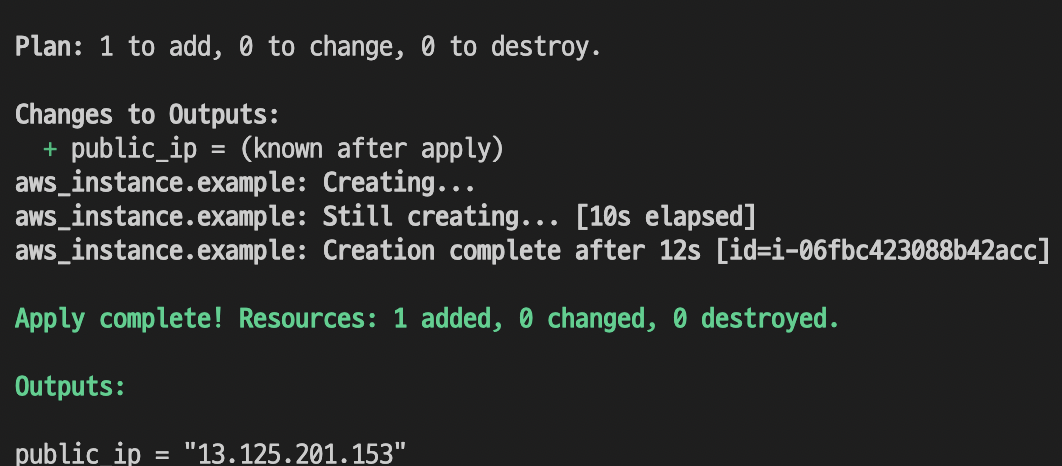

자.. 다시 .tfstate를 삭제하고 sg까지만 복구시켜준 상황으로 돌린다.

기존에 만든 인스턴스를 그대로 추가해주고 이번에 새로만든 인스턴스도 있으니 마찬가지로 추가해준다.

안되는 이유는 소스 코드에 없다. 그래서 리소스는 이미 불러왔고 기존에 새로만든 것은 없기에 ... 소스코드를 추가해볼까 ?
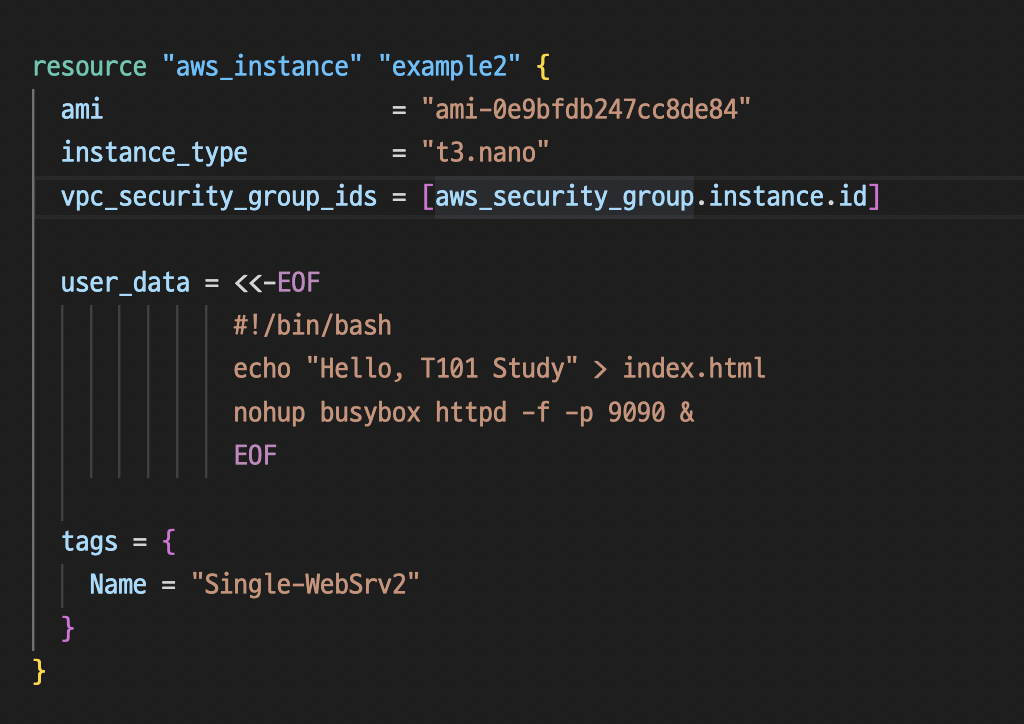

기존에 설정된 것과 인스턴스 타입과 user_data, tags가 모두 다르다. 하지만 일단 import까진 정상적으로 성공
terraform plan 시,

역시나 기존 것과 다르다. 심지어 리소스가 소스 코드에 없다면 지워버릴 것이다. 이런 경우에 소스 코드와 배포된 인프라와 차이가 있는 것이니 .tfstate를 날려먹거나, S3 Versioning으로 파일관리를 하지 않은 경우라면 하나하나 한땀한땀 복구하길 바란다.

이런식으로 리소스는 추가했으나 코드에 없다고 한다면 삭제시켜버릴 것이다.
Terraform 코드도 없는 상태고 .tfstate도 없고 나에게 주어진 것이라곤 인프라에 배포된 리소스밖에 없다라고 하면 한땀한땀 만들어보자
Terraforming이라는 Ruby프로젝트가 있으나, AWS만 지원하는 것이 안타깝다.
https://github.com/dtan4/terraforming
[GitHub - dtan4/terraforming: Export existing AWS resources to Terraform style (tf, tfstate) / No longer actively maintained
Export existing AWS resources to Terraform style (tf, tfstate) / No longer actively maintained - GitHub - dtan4/terraforming: Export existing AWS resources to Terraform style (tf, tfstate) / No lon...
github.com](https://github.com/dtan4/terraforming)
우선은 설치를 해볼까?

RUBYRUBY해!
/bin/bash -c "$(curl -fsSL https://raw.githubusercontent.com/Homebrew/install/HEAD/install.sh)"


rbenv가 가벼운 실행환경이다보니 rbenv를 요샌(22.11.12) 선호
brew install rbenv ruby-build

# rbenv를 zsh에 추가 (bash인 경우는 다릅니다.)
vim ~/.zshrc
[[ -d ~/.rbenv  ]] && \
  export PATH=${HOME}/.rbenv/bin:${PATH} && \
  eval "$(rbenv init -)"
source ~/.zshrc

ruby -v


이어서 rbenv를 이용해 ruby를 설치해줍니다. 현재 ruby의 최신 버전은 ruby 3.2.0 버전이며 원하는 버전을 지정해서 설치할 수 있습니다.
하지만 현시점에 3.1.2 Stable!

# Install Ruby
rbenv install 3.1.2
rbenv global 3.1.2
rbenv rehash

ruby -v

Bundler 설치
gem install bundler
rbenv rehash

rbenv-gem-rehash을 설치하면, 매번 rbenv rehash 명령을 실행하지 않아도 됩니다.
자 루비 설치는 완료했고 Terraforming 깃의 설치방법을 고대로 따라해보자!
gem install terraforming

terraforming sg
terraforming ec2
Terraforming이 지원하는 서비스
$ terraforming
Commands:
  terraforming alb             # ALB
  terraforming asg             # AutoScaling Group
  terraforming cwa             # CloudWatch Alarm
  terraforming dbpg            # Database Parameter Group
  terraforming dbsg            # Database Security Group
  terraforming dbsn            # Database Subnet Group
  terraforming ddb             # DynamoDB
  terraforming ec2             # EC2
  terraforming ecc             # ElastiCache Cluster
  terraforming ecsn            # ElastiCache Subnet Group
  terraforming efs             # EFS File System
  terraforming eip             # EIP
  terraforming elb             # ELB
  terraforming help [COMMAND]  # Describe available commands or one specific command
  terraforming iamg            # IAM Group
  terraforming iamgm           # IAM Group Membership
  terraforming iamgp           # IAM Group Policy
  terraforming iamip           # IAM Instance Profile
  terraforming iamp            # IAM Policy
  terraforming iampa           # IAM Policy Attachment
  terraforming iamr            # IAM Role
  terraforming iamrp           # IAM Role Policy
  terraforming iamu            # IAM User
  terraforming iamup           # IAM User Policy
  terraforming igw             # Internet Gateway
  terraforming kmsa            # KMS Key Alias
  terraforming kmsk            # KMS Key
  terraforming lc              # Launch Configuration
  terraforming nacl            # Network ACL
  terraforming nat             # NAT Gateway
  terraforming nif             # Network Interface
  terraforming r53r            # Route53 Record
  terraforming r53z            # Route53 Hosted Zone
  terraforming rds             # RDS
  terraforming rs              # Redshift
  terraforming rt              # Route Table
  terraforming rta             # Route Table Association
  terraforming s3              # S3
  terraforming sg              # Security Group
  terraforming sn              # Subnet
  terraforming snst            # SNS Topic
  terraforming snss            # SNS Subscription
  terraforming sqs             # SQS
  terraforming vgw             # VPN Gateway
  terraforming vpc             # VPC

Options:
  [--merge=MERGE]                                # tfstate file to merge
  [--overwrite], [--no-overwrite]                # Overwrite existng tfstate
  [--tfstate], [--no-tfstate]                    # Generate tfstate
  [--profile=PROFILE]                            # AWS credentials profile
  [--region=REGION]                              # AWS region
  [--use-bundled-cert], [--no-use-bundled-cert]  # Use the bundled CA certificate from AWS SDK
소스코드와 배포된 인프라를 확인해보면
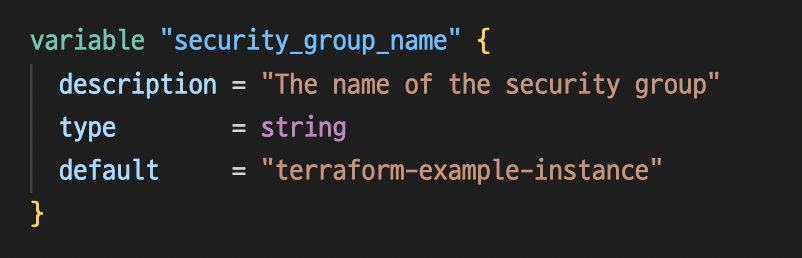
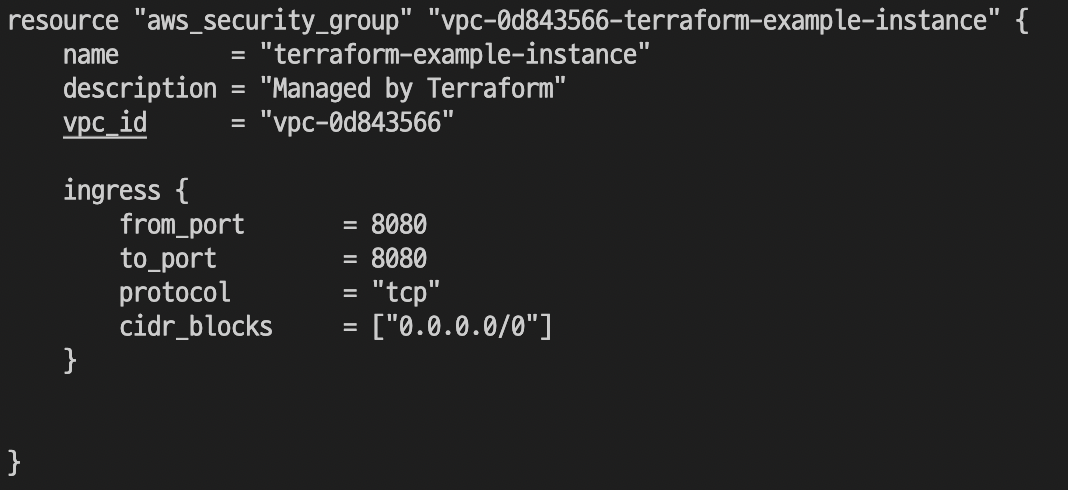


내게 없는 부분은 Single-WebSrv4444 였으니 맞춰서 소스코드를 작성해주자

보통 Git작업이나 S3, Backend, DynamoDB등을 통한 버저닝 관리등을 잘해왔다면 문제가 없을 것이지만
AWS 인프라 환경에서 Terraform으로의 전환을 꿈꾸시는 분들이라면 어느정도 포스팅이 도움되었으면 합니다.
리소스를 가져오는 것은 좋으나 참조관계를 정해주지 않으며 ec2 user_data같은 부분은 가져오지 못하고 다 가져오지 못한다.
서비스도 모두 지원하진 않고 AWS에 한정적이다.
'Infrastructure as Code > Terraform' 카테고리의 다른 글
| [T101 Study 3주차] 상태 파일 격리 방안 (2) | 2022.11.22 |
|---|---|
| [T101 Study 3주차] 상태 관리 (0) | 2022.11.21 |
| [T101 Study 2주차] VPC / Security Group / EC2 / AutoScalingGroup / ELB (0) | 2022.11.21 |
| [T101 Study 1주차 도전 과제] 기본 틀 배포 (0) | 2022.11.07 |
| [T101 Study 1주차] Terraform 용어 정리 및 기초 및 설치 (1) | 2022.11.07 |


